B2B Digital Office
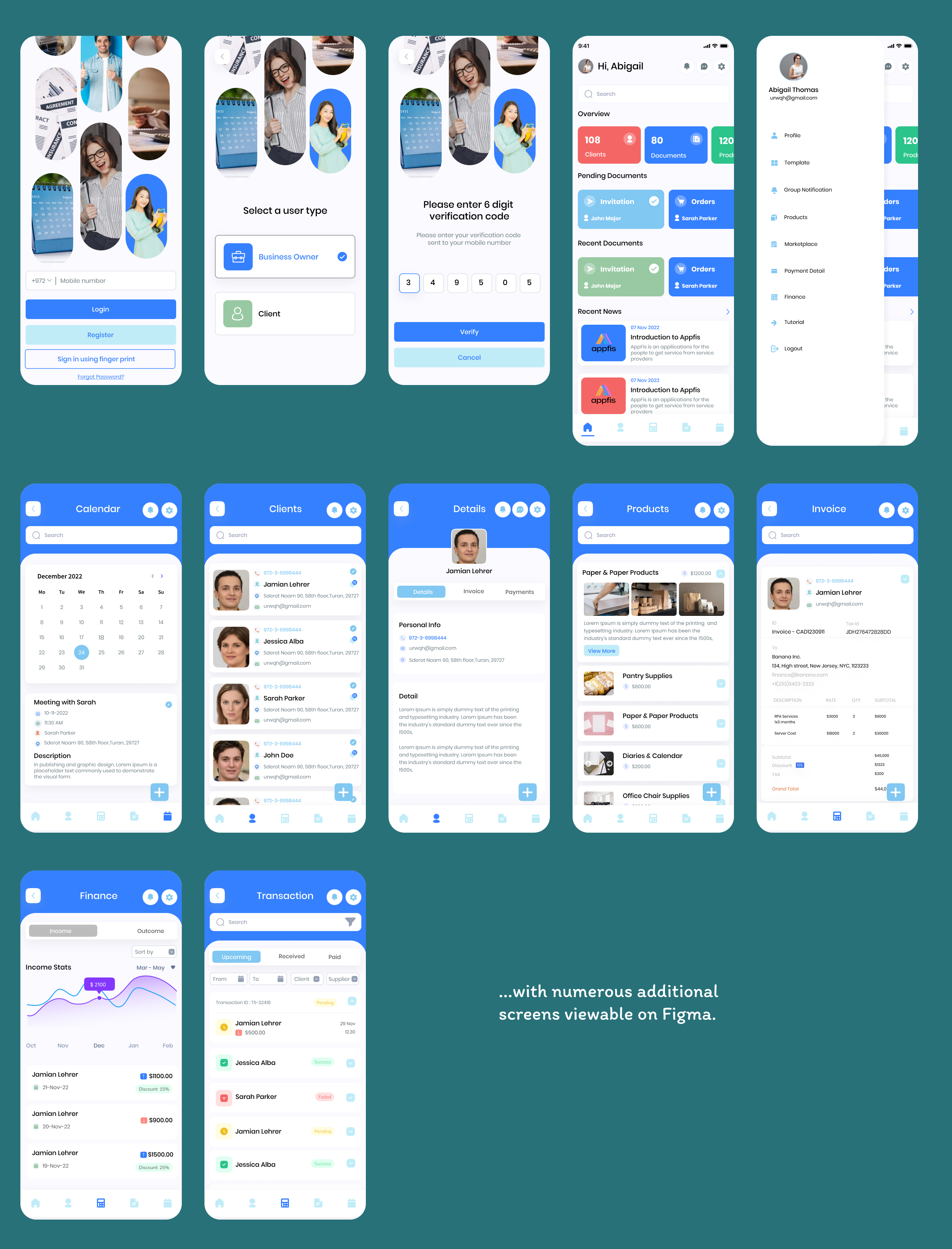
Overview
The B2B Digital Office Mobile Application is a robust solution designed to simplify and automate business operations. It integrates tools for managing clients, documents, tasks, and communications within a single intuitive platform. With a focus on mobility and accessibility, the app empowers business owners, employees, and clients to collaborate efficiently in a modern digital office environment.
Key features include:
- Client Management: Easily manage client details, communications, and documents in one place.
- Dashboard Analytics: Provide an overview of key business metrics like clients, documents, and pending tasks.
- Document Handling: Manage orders, invoices, invitations, and other documents digitally.
- Recent News: Stay updated with in-app notifications and announcements.
Target Audiences
- Small and Medium Enterprises (SMEs): Business owners looking to digitize their processes.
- Employees: Team members who need to manage workflows and communicate seamlessly.
- Clients: Customers who require a user-friendly interface for communication and document management.
- B2B Companies: Enterprises that collaborate and share services with other businesses.
Problem Statement
Businesses often struggle with:
- Fragmented Tools: Using multiple platforms to manage clients, documents, and communications leads to inefficiencies.
- Lack of Integration: Inability to sync data across tools increases the risk of errors and reduces productivity.
- Manual Processes: Heavy reliance on paper and email-based workflows slows down operations.
- Limited Mobility: Most tools are designed for desktops, making it hard for teams to work on the go. Modern businesses, particularly SMEs and B2B enterprises, face numerous challenges in streamlining their operations:
- Data Silos: Information related to clients, documents, and tasks is often scattered across multiple disconnected platforms, making it difficult to maintain consistency and accessibility.
- Inefficiency in Communication: Communication gaps between internal teams and clients hinder collaboration, leading to missed opportunities and delayed deliverables.
- Document Overload: Managing documents manually or through disparate systems results in misplacement, duplication, and delays in approvals.
- Limited Customization: Generic tools fail to address the unique needs of businesses, such as role-specific access, branded workflows, or tailored notifications.
- Scalability Issues: As businesses grow, manual workflows and fragmented systems cannot keep up, creating bottlenecks in processes.
- On-the-Go Limitations: Many businesses are moving toward a mobile workforce, but a lack of efficient mobile solutions impairs productivity for employees working remotely.
Possible Solution
The B2B Digital Office Mobile Application addresses these pain points by:
- Centralizing client management, documents, and communication within a single platform.
- Offering seamless data synchronization across devices and users.
- Enabling mobility through a user-friendly mobile interface.
- Providing robust analytics to track performance and pending tasks.
The B2B Digital Office Mobile Application solves these problems by delivering a comprehensive and scalable digital platform that centralizes business operations and ensures seamless collaboration. Here's how:
- Unified Platform: Centralize client data, document handling, and communication into one app to eliminate fragmentation and inefficiencies.
- Automation: Automate repetitive tasks such as document approvals, reminders for deadlines, and status updates, saving time and effort.
- Mobile-First Design: Provide a seamless, mobile-friendly user experience, allowing users to manage tasks, clients, and documents anytime, anywhere.
- Role-Based Personalization: Customize user access, dashboards, and notifications based on specific roles (e.g., admin, client, employee).
- Data Insights and Analytics: Use advanced analytics to provide actionable insights, helping businesses optimize performance and improve decision-making.
- Document Lifecycle Management: Ensure every document (e.g., invoices, invitations, orders) is tracked from creation to approval with status indicators.
- Collaborative Tools: Enable teams and clients to collaborate effectively with in-app messaging, shared document editing, and task tracking.
- Secure Data Management: Offer end-to-end encryption, secure storage, and audit trails to ensure compliance and data protection.
- Third-Party Integrations: Seamlessly integrate with popular CRM, ERP, and productivity tools to enhance flexibility and scalability.
- Task Management: Assign and monitor tasks in real-time.
- Collaboration Tools: In-app messaging and shared document editing.
- Customizable Notifications: Alerts for document approvals, client updates, and deadlines.
Quantitative Research
- Market Survey: Surveyed 500 SMEs; 78% reported challenges in using multiple tools for client and document management.
- Efficiency Gains: Businesses using similar apps reported a 30% increase in productivity within six months of adoption.
- User Retention Rate: The beta version of the app achieved a 90% retention rate among initial testers, indicating strong user satisfaction.
Design Thinking Process
- Empathize: Conducted interviews and surveys with SMEs to identify their pain points in managing business operations.
- Define: Defined the primary goals of the app: to enhance efficiency, reduce manual workflows, and promote seamless collaboration.
- Ideate: Brainstormed potential features such as real-time dashboards, document management, and personalized notifications.
- Prototype: Created mockups and interactive prototypes of the app, incorporating client, document, and dashboard screens.
- Test: Gathered feedback from beta users, leading to iterative improvements in usability, layout, and features.
B2B Features (Additional Suggestions)
- Integration with CRM and ERP Systems: Allow businesses to link the app with existing tools like Salesforce or SAP.
- Role-Based Access Control: Ensure data security by granting access to specific features based on user roles (e.g., admin, employee, client).
- White Labeling: Enable businesses to customize the app’s interface with their branding.
- Advanced Analytics: Provide insights on sales trends, client engagement, and document approval rates.
- API Support: Allow businesses to integrate third-party services seamlessly.
Takeaway Lessons
- Listen to Your Audience: The app was developed based on insights from SMEs and B2B enterprises, emphasizing the importance of understanding the end user’s pain points before crafting a solution.
- Mobile-First is Key: With businesses relying increasingly on mobile solutions, designing a responsive and mobile-friendly application is critical for adoption and engagement.
- Centralization Matters: Businesses value solutions that consolidate tools and processes, reducing the need for multiple disconnected systems.
- Customization Drives Engagement: Role-based access and personalization features enhance usability and ensure the app meets diverse business needs.
- Scalability is Essential: The app’s flexibility and integration capabilities make it suitable for businesses of all sizes, from startups to large enterprises.
- Feedback is Vital: Continuous testing and feedback loops with beta users drive iterative improvements, ensuring the app remains relevant and user-friendly.